
Deleting your account and ending your membership
Don’t want to use FreeHomeSwap.com any more? You can delete your account yourself – no need to e-mail us.
Please note before you start
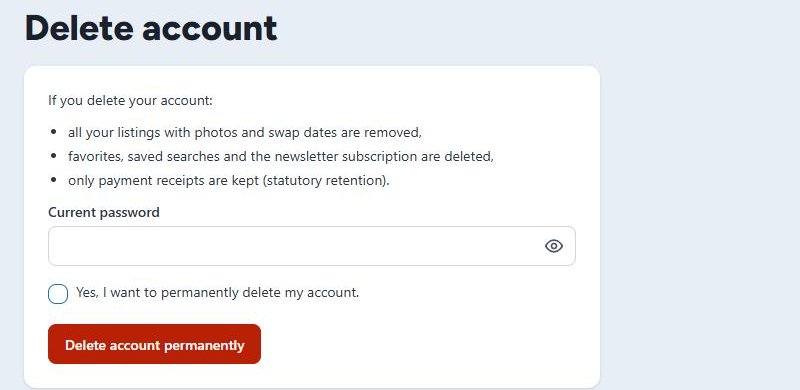
- Deleting your account also removes all your listings with their photos and swap dates.
- Your favorites, saved searches and newsletter subscription are deleted as well.
- Only payment receipts are kept (statutory retention).
- Deleting cannot be undone. If you want to swap again later, simply create a new account.
How to delete your account
- Log in and click Profile & password at the top.
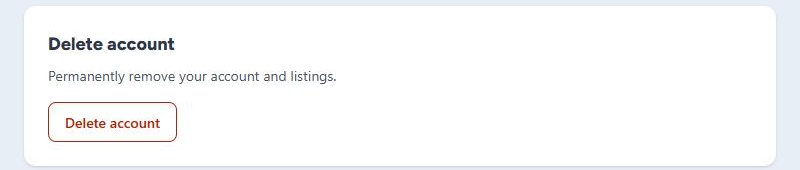
- At the very bottom you will find the Delete account box. Click Delete account there.
- Enter your current password to confirm.
- Tick “Yes, I want to permanently delete my account.”
- Click Delete account permanently.
Your account is deleted immediately, you are logged out and taken to the home page. You will receive a confirmation e-mail.
Forgot your password?
Log out and request a new one on the login page via Forgot your password?. Then delete your account as described above.
Delete just one listing and keep your account
In My area, click Delete (red cross, far right) next to the listing. Tick “Yes, I want to permanently delete this listing.” and click Delete listing permanently.
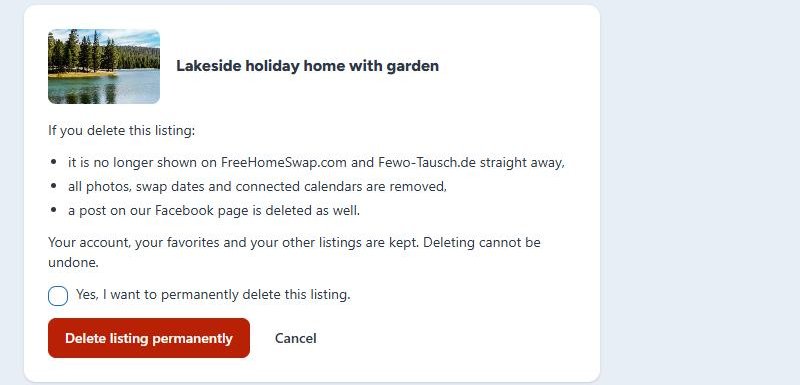
The listing disappears straight away; photos, swap dates and connected calendars are removed. Your account, your favorites and your other listings are kept. If the listing has a running TOP listing, it ends early – the remaining period is not refunded.
Just need a break?
- Not swapping for a while: mark the time as booked under Swap dates. See Managing your swap dates.
- No more e-mails: unsubscribe from the newsletter via the link at the end of every issue.
Stuck? Write to us at info@fewo-tausch.de – we will then delete your account for you.